
THE FIRST RUN FIELD GUIDE
PokéPath TD Guide
for Beginners
Choose a starter that fits your play style. Learn where to place your Pokémon, when to buy levels, and how to use Retry and save your progress.
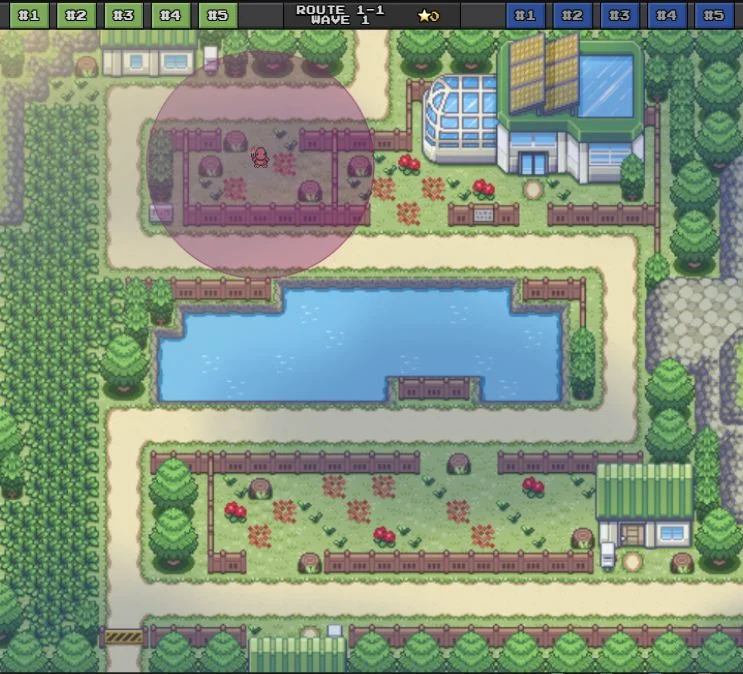
Place Charmander where its range reaches both sections of the path.
YOUR FIRST RUN
- 01Place for coverage
Choose a legal tile with as much path inside your range as possible.
- 02Grow a small core
Spend gold on useful upgrades before spreading it across your whole Box.
- 03Read the next wave
Check armor and invisibility before you press Next Wave.
01 / YOUR FIRST DECISION
Which PokéPath starter should you choose?
Start with Charmander for a simple field placement and Burn damage. Choose Treecko to use grass tiles for extra power, or Froakie for bouncing attacks that can reach groups.

Charmander
Burn
Attacks inflict Burn. Use its damage over time while enemies stay in range.
- Terrain
- Field
- Good fit
- Choose it if you want a straightforward start while learning placement.
- Keep in mind
- Check enemy Burn resistance; one damage type will not solve every wave.
Charmeleon · Lv. 16 → Charizard · Lv. 36

Treecko
Ambusher
Power increases by 100% when placed on grass. The tile it stands on matters.
- Terrain
- Field / Grass
- Good fit
- Choose it if you are happy to plan around grass tiles with good path coverage.
- Keep in mind
- A field tile is legal, but it does not activate the grass bonus.
Grovyle · Lv. 16 → Sceptile · Lv. 36

Froakie
Ricochet
Attacks bounce between enemies, losing 30% damage with each bounce.
- Terrain
- Field / Water
- Good fit
- Choose it if you like positioning around groups of enemies for ricochets.
- Keep in mind
- Water is a placement option, not an automatic damage bonus.
Frogadier · Lv. 16 → Greninja · Lv. 36
Your starter is a starting point, not your whole team. The other starters can be obtained later through Shop eggs; you do not need to reset just to try another one.
Deciding who deserves your next upgrade? Compare Pokémon roles in the Tier List
02 / BUILD THE HABIT
How to play PokéPath TD: placement and upgrades
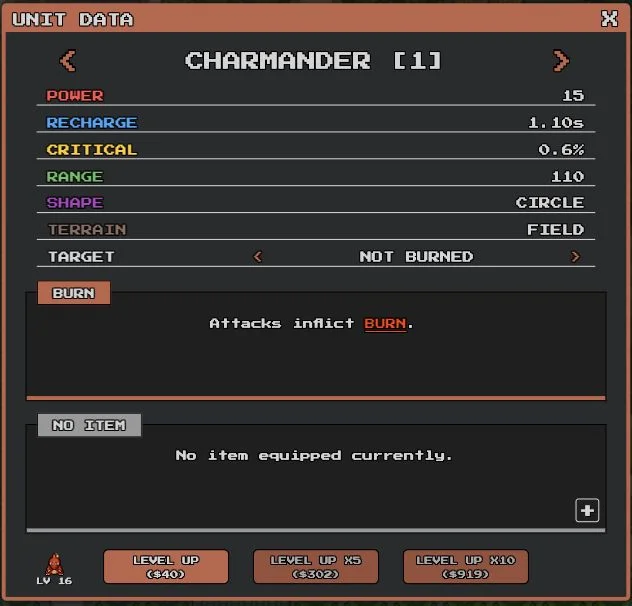
You start with $50. A level 1 Charmander costs $40 to level up in version 1.7.1. Use the unit panel to compare the next upgrade with the cost of a new Pokémon.
- 1
Select a Pokémon and check its terrain
Click its team portrait, or use keys 1–0 for team slots. Choose a legal placement tile. Open the blue i button for UNIT DATA to see terrain, range, ability and targeting.
- 2
Make its range cover the route
Press X to show ranges. Prefer a tile that covers a long stretch or more than one pass of the path. A central-looking tile is only useful if enemies actually enter its range.
- 3
Preview the enemy, then start the wave
Read the right-hand enemy panel: health, armor, speed, resistances and Invisible. Press Next Wave or Space when your team has the coverage and tools for it.
- 4
Buy levels with gold
Use the green +1 on the team tile or the LEVEL UP controls in UNIT DATA. The panel also offers ×5 and ×10 purchases. Check the total cost before buying several levels.
- 5
Add a missing role before another attacker
Open Shop with S for new Pokémon; purchase prices rise as you buy. Use E to manage your active team and Box. Add detection, armor damage or control when a wave calls for it.
Start with six active slots
The Box can hold more Pokémon than your active team. Slots 7–10 unlock at 40, 160, 320 and 540 total stars. Fill the slots you have with useful roles; an empty slot is not a reason to buy a Pokémon you cannot yet afford to develop.
The controls you will use most
- 1–0
- Select / place a team slot
- X
- Show attack ranges
- Space
- Start the next wave
- E
- Open team / Box
- S
- Open Shop
- W
- Choose a map
- Esc
- Close a window
03 / CHANGE ONE THING
Stuck on a wave? Find what is getting through
Watch the leak before buying more levels. A damage shortage, an armored target and an invisible enemy need different fixes.
| What you see | What to check | Your next move |
|---|---|---|
| Your Pokémon do not attack an enemy | What to checkInvisible is marked Yes, or the enemy never enters the attack area. | Your next moveCheck range first. If it is invisible, bring detection: Natu / Xatu can detect for themselves; a Watchog or Lanturn aura can help nearby attackers. |
| An armored enemy survives your damage | What to checkThe preview shows armor, and your current team is slow to remove it. | Your next moveTry an armor specialist if you own one. Excadrill deals double damage to armor. Check the enemy’s status resistances before relying on Burn or Poison. |
| Ordinary enemies leak out with low health | What to checkToo little time in range, a weak main attacker, or damage spread across too many low-level units. | Your next moveImprove path coverage, then focus gold on your main damage source. Add slowing or stunning support if the enemy is susceptible. |
| The next map is too hard | What to checkYou have pushed past what your current levels and roster can handle. | Your next moveUse W to return to an easier available route. The tutorial confirms that changing maps preserves route progress. Build up your team, then return. |
After each change, replay the wave and watch what reaches the exit. Adjust one role or placement at a time so you can see what helps.
04 / MAKE REPEATS USEFUL
Auto, Retry and Restart do different jobs
Learn a wave manually before leaving Auto running. If a repeat stalls, pause to improve path coverage or add the role your team is missing.
- AutoCONTINUE WAVES
- Advances waves automatically. It is the wave-flow control, separate from what happens after a loss.
- RetryUSE A CHECKPOINT
- In Settings → Auto Reset, Retry resumes from a reached checkpoint. The official FAQ lists checkpoints at waves 25, 50, 75 and 100.
- RestartRETURN TO THE START
- Auto Reset → Restart starts the route again from wave 1. Use it deliberately when you want to repeat earlier waves.
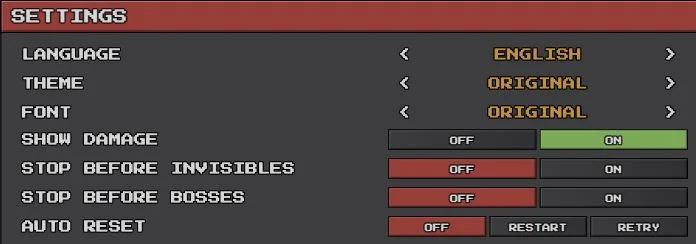
For your first attempts
- Keep Auto Reset off while you diagnose a failed wave.
- Turn on Stop Before Invisibles and Stop Before Bosses if you want time to inspect those waves.
- After reaching a checkpoint, choose Retry if you want to continue from it.
- If a repeat keeps failing, pause and change your team or placement.
05 / KEEP YOUR PROGRESS
Back up your save before switching browsers
Your progress is stored in the browser you play in. Autosave runs when you change maps or finish a wave. To move to another browser, device or game host, export a save file first.
Export from the browser you play in
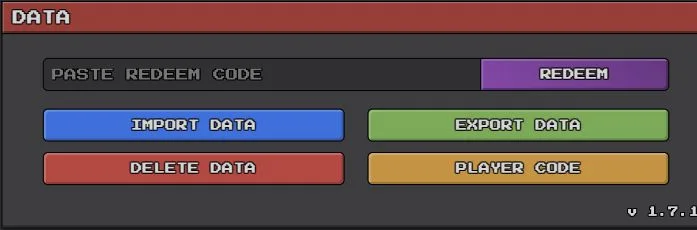
- Open the gear icon, then scroll to Data.
- Choose Export Data, then Download.
- Keep the downloaded .txt file somewhere you can find again. Export a fresh copy after important progress.
Import into the destination browser
- Export the destination browser’s existing save first, if it has progress you want to keep.
- Open Settings → Data → Import Data and upload your .txt file.
- Choose Load Save, then check your team and route progress.
Can you play PokéPath TD on mobile?
PC is the recommended way to play. The official FAQ says the game is not optimized for phones: Android usually works, while iOS Safari may not load it. Brave may load on iOS, with fullscreen limitations. Back up before moving devices; do not assume saves transfer automatically. Official compatibility notes
Will clearing browser data remove my progress?
It can. Local game data lives in the browser. Export a .txt backup before clearing site data, changing browsers or moving to a different game host.
Why does my run keep going back to wave 1?
Check whether you have reached a checkpoint, then check Settings → Auto Reset. Restart returns to the beginning; Retry uses a reached checkpoint. The first checkpoint listed in the official FAQ is wave 25.
Do I need a perfect ten-Pokémon team to start?
No. You begin with six active slots, and the remaining four require stars. Develop a small damage core and add the specific support your next waves need.
READY FOR THE NEXT WAVE
Put the next adjustment to work
Return to the game with one change in mind. For a full lineup, use the route teams; for upgrade choices, compare the Tier List.
Sources & version notes
Independent guide by PokéPath Game, reviewed Nov 2, 2026. Controls and screenshots use the official 1.7.1 browser game. Starter abilities and evolution levels follow the official Pokédex.